CoreviaFlowCOREVIAFLOWDIGITAL PROJECT COMPANY Leave a request
EN UA RU
AI modelsUS

OpenAI integration & automation

OpenAI models inside your CRM: emails parsed, calls summarised, reply drafts ready for a human to check.

We connect OpenAI models to your CRM so routine reading and writing happens without a manager. Incoming emails and chat messages are read and turned into filled-in lead fields. Call recordings from your telephony become short summaries in the deal card. The model drafts replies, sorts requests by type and pulls names, dates and item lists out of documents. A person stays in charge: replies go to clients only after a manager checks them or by rules you approved in advance, and the model can make mistakes, so its output is marked as a draft, not a fact.

What we connect

  • Your own OpenAI account and access key: the connection runs under your account, and you can revoke the key at any time.
  • Reading incoming emails and chat messages: the model finds who is writing, what they need and when, and fills the lead card with those fields.
  • Call summaries: a recording from your telephony is turned into text, then into a short summary with agreements and next steps in the deal card.
  • Reply drafts: the model writes a reply in your tone of voice, the manager reads it, edits if needed and sends it.
  • Sorting requests: each new lead gets a type (purchase, question, complaint, spam) and lands in the right pipeline stage or with the right person.
  • Fields from documents: names, dates, addresses and item lists are pulled out of orders, invoices and specifications into a fixed set of CRM fields, so the result always has the same shape.
  • Sending rules: what goes out automatically and what waits for a human is written down once with you and can be changed later.

Automation scenarios

01

A request arrives by email at night

Before the email sits unread until the morning, then a manager reads it, creates a lead by hand and retypes the phone number and product.

After by the morning the lead card already has the contact, the requested product and the deadline, plus a reply draft the manager only needs to check.

02

A long call with a client

Before after a twenty-minute call the manager writes a two-line note from memory, and the details are lost.

After the recording is turned into text, the model writes a summary with what was agreed and what to do next, and the note lands in the deal card while the manager moves on to the next call.

03

Dozens of messages from different channels

Before messages from the website, messengers and email land in one pile, and someone reads them all to find the real buyers.

After each message gets a type and an urgency mark, spam and off-topic requests are set aside, and buyers go straight to the sales stage with the right person.

04

An order comes as a scanned document

Before the manager opens the file, reads the table and retypes every line into the CRM, making typos along the way.

After the model reads the document and fills a fixed set of fields, the manager compares them with the original in a minute and confirms.

How it works technically

For those who want to check: each point links to the official documentation page it comes from.

  • Data sent through the OpenAI platform is not used to train or improve OpenAI models by default, unless the account owner explicitly opts in.

    Source: developers.openai.com ↗ checked 2026-09-27
  • All current OpenAI models take text and images as input, return text and work in many languages.

    Source: developers.openai.com ↗ checked 2026-09-27
  • Structured Outputs makes the model always answer in a predefined structure, without missing a required field or inventing a value outside the allowed list.

    Source: developers.openai.com ↗ checked 2026-09-27
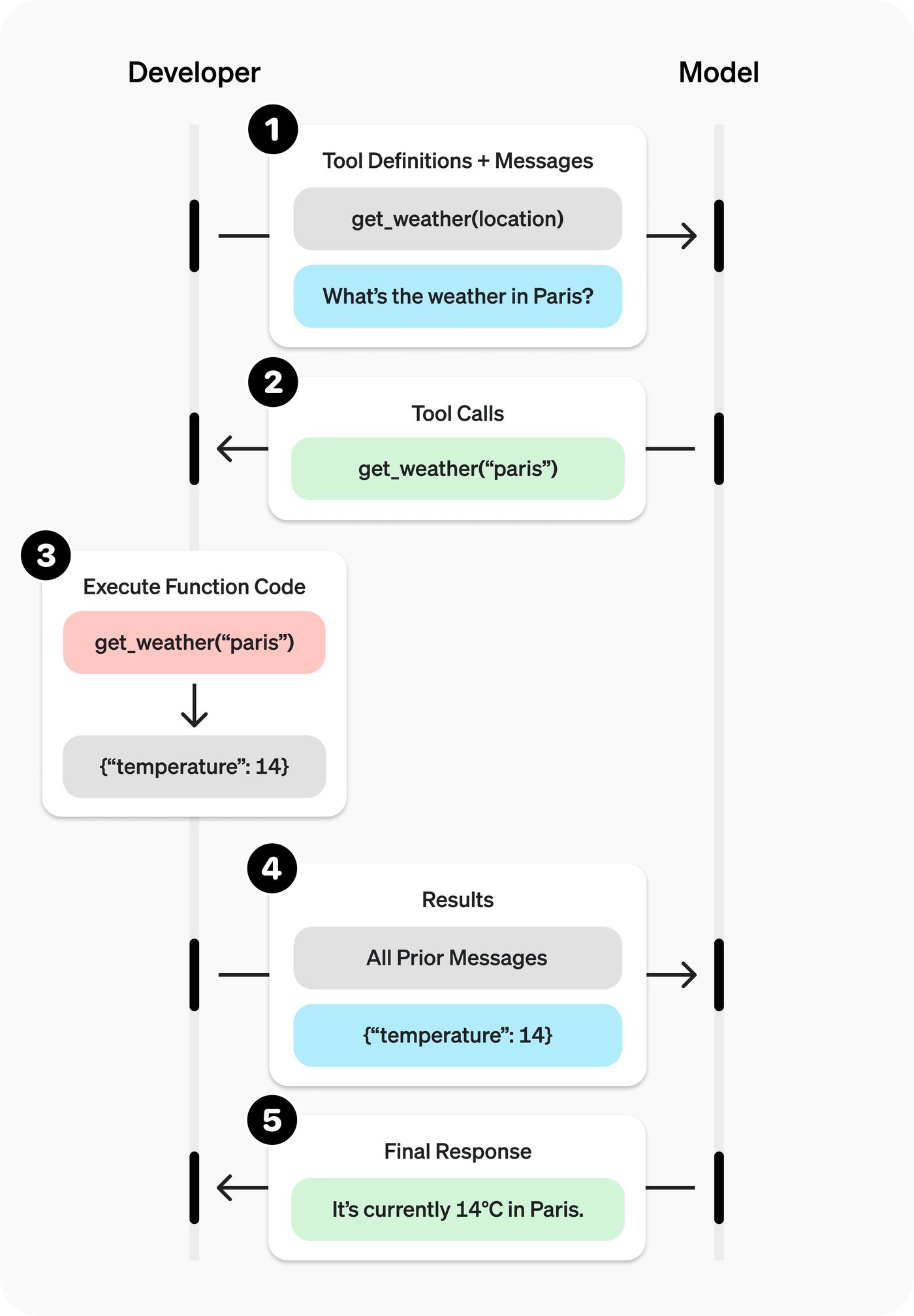
  • Function calling lets the model pass data to the client's application, where the code reads data or performs actions the model suggested.

    Source: developers.openai.com ↗ checked 2026-09-27
  • File transcription: upload a finished recording and get the final text, or receive the text as a stream while the model is processing the file.

    Source: developers.openai.com ↗ checked 2026-09-27
  • As usage of the platform grows, OpenAI automatically moves the account to the next usage tier, which usually raises request limits for most models.

    Source: developers.openai.com ↗ checked 2026-09-27

Limits

The model can make mistakes: a summary may miss a detail and an extracted field may be wrong, so its output is treated as a draft that a person checks, and replies to clients go out only after a manager's check or by rules approved in advance. Payment to OpenAI is by actual usage under your own account; request limits depend on the account's usage tier and grow with usage. By default OpenAI keeps abuse-monitoring logs of platform requests for up to 30 days; the zero-retention mode is available only with OpenAI's prior approval. A recording for transcription is limited to 25 MB, so long calls are split into parts. Ukraine is on the list of supported countries with certain exceptions that OpenAI does not spell out.

Screenshots

OpenAI function calling scheme: the application sends a question and a list of allowed actions, the model picks an action, the application runs it and the model writes the final answer
How the model asks the CRM to act Source: developers.openai.com ↗

How to start

Three steps from a first message to work on your project.

  1. 01

    Leave a request

    Describe the task in the form — in text or by voice. Budget and timing are optional.

  2. 02

    We review and estimate

    A developer studies the brief, asks about anything unclear and sends an estimate.

  3. 03

    We start

    Once scope and price are agreed, the work begins.

or write to info@coreviaflow.space

Questions

Will the model answer my clients on its own?
Only if you decide so. By default the model prepares a draft, and the manager sends it after reading. For simple cases you can approve rules in advance, for example an automatic confirmation that a request was received; everything else waits for a person.
Will OpenAI learn from my clients' correspondence?
By OpenAI's own documentation, data sent through the platform connection is not used to train its models unless the account owner opts in. Note that OpenAI keeps abuse-monitoring logs for a limited time by default; the details are in the facts section below.
What if the model gets something wrong?
It can happen, and we build the work around that: every result is marked as a draft, the manager sees the source next to it (the email, the recording, the document) and confirms with one click or corrects. We do not promise that the model is always right.
How is OpenAI usage paid for?
OpenAI bills your own account for actual usage, and the amount depends on how much text and audio the models process. The connection runs under your account, so you see the usage in your OpenAI dashboard and can set your own spending limits there.

Tell us what needs to be connected

Describe the task in text or a voice message. We look at your setup and reply with a plan.

Pairs with OpenAI

Related integrations

Implementation · Development · Integrations →

OpenAI is a trademark of its owner. CoreviaFlow is not affiliated with it unless stated otherwise. Screenshots are taken from public vendor materials; the source is shown under each one.