CoreviaFlowCOREVIAFLOWDIGITAL PROJECT COMPANY Leave a request
EN UA RU
Automation & workspaceUS

Asana integration & automation

A won deal becomes a project in Asana, a client's request becomes a task with a link to their card, and the manager sees task progress in the CRM without asking the team.

Asana is where the delivery team lives: projects, tasks, sections, deadlines and who is doing what. The CRM is where the client, the deal and the money live. Between them there is usually a person — the account manager who creates the project by hand after every sale, retypes what was agreed and then keeps asking in chat whether the task is done. The connection takes that person out of the middle: a won deal opens a project or a task from your template with the client's details already in it, a client's request becomes a task with a link to the card, a task completed in Asana is reflected on the deal in the CRM, and a comment from the team lands in the client's history. The team keeps working in Asana, managers keep working in the CRM, and nobody copies anything.

What we connect

  • We look at your Asana together: which workspace and projects take part, which sections and custom fields matter, and which of them should be visible in the CRM. Usually one or two projects or one template take part, not the whole workspace.
  • Your Asana administrator chooses how the connection signs in. For a connection that works only for your company, Asana itself suggests the simple way: a personal access key issued in the developer console under a named user. For an application that acts on behalf of several people, Asana uses sign-in with explicit consent from each of them.
  • We map the deal to the task or project: the deal name to the title, the client and the link to the card to the description, the CRM manager to the follower, the assignee in Asana to the responsible person shown in the CRM. Sections and custom fields in Asana are matched to the stages you want to see on the deal.
  • We agree what starts what: a deal marked won creates a project from your template or a task in the chosen project; a client's request marked in the CRM creates a task; a task completed in Asana changes the deal stage; a comment on the task is copied to the client's history.
  • We set up notifications: Asana itself sends a notice to the connection whenever a task in the chosen projects is created, changed, completed or commented on — so nothing has to be checked by hand. The notices are filtered to the events that matter to the CRM, so the connection is not flooded with everything that happens in Asana.
  • We run the connection on a test project first, check the tasks it creates against your template, and only then point it at the live projects. Your boards, timelines and rules inside Asana stay exactly as they were.

Automation scenarios

01

A won deal opens a project from your template

Before after every sale the account manager creates a project in Asana by hand, copies the checklist from the last one and retypes the client's details — half an hour per client, and steps get missed.

After the moment the deal is marked won, a project appears from your template with the client, the agreed scope, the deadline and a link to the deal already in it; the team lead only assigns people.

02

A client's request becomes a task with a link to the card

Before the client writes 'please change the logo on the banner', the manager forwards it to the designer in chat, and a week later nobody remembers which client and which banner.

After the manager marks the message as a request in the CRM, and a task appears in Asana with the client's words, a link to the card and the manager's name; the designer opens the card and sees the whole history before starting.

03

A task is completed — the manager sees it in the CRM

Before the manager asks the team 'is it done yet?' several times a day, and the client asks the manager the same.

After when the team completes the task or moves it to another section in Asana, the deal in the CRM shows the same stage on its own, and the manager answers the client without opening Asana.

04

A comment from the team lands in the client's history

Before the designer writes in the task 'need the source file from the client', and the manager sees it only when they think to open Asana.

After a comment on the task is copied to the client's history in the CRM with the author and the time, the manager reads it in their usual place and asks the client for the file right away.


How it works technically

For those who want to check: each point links to the official documentation page it comes from.

  • Asana's platform is built on a REST API, app components and webhooks; apps can be built and shared, or built only for your own organization.

    Source: developers.asana.com ↗ checked 2026-09-28
  • A personal access token gives access to the Asana REST API on behalf of its owner; for apps acting on behalf of other users Asana recommends OAuth.

    Source: developers.asana.com ↗ checked 2026-09-28
  • Webhooks push events to the integration via HTTP POST instead of the integration repeatedly polling Asana for changes.

    Source: developers.asana.com ↗ checked 2026-09-28
  • Webhook events are delivered in under a minute on average, most within 10 minutes; if the receiving server does not answer within 10 seconds, Asana retries for up to 24 hours.

    Source: developers.asana.com ↗ checked 2026-09-28
  • When a rate limit is hit, Asana answers 429 with a Retry-After header saying how many seconds to wait; limits are counted per token.

    Source: developers.asana.com ↗ checked 2026-09-28

Limits

Asana limits how often it can be asked: the number of requests per minute depends on whether your Asana domain is on a paid plan or not, and when the limit is exceeded Asana answers with error 429 and names how many seconds to wait; the connection is built to wait and retry, and bulk changes go in portions. No more than 50 reads and 15 writes may be in progress at the same time, and heavy jobs such as duplicating a project, creating one from a template or exporting are limited to 5 at once per user — including the ones that user starts in Asana by hand. Notifications from Asana are usually delivered within a minute, but Asana designs them as 'at most once': in rare cases an event may not arrive and cannot be replayed, so for changes that must never be lost we add a periodic check on top of the notifications. To receive notifications at all, the connection needs its own server with a public address that answers within 10 seconds; if it stays silent, Asana keeps retrying for a day and then stops. A personal access key acts on behalf of the person who issued it, so we recommend a named user with access to the agreed projects only, and a regular review of issued keys.

Screenshots

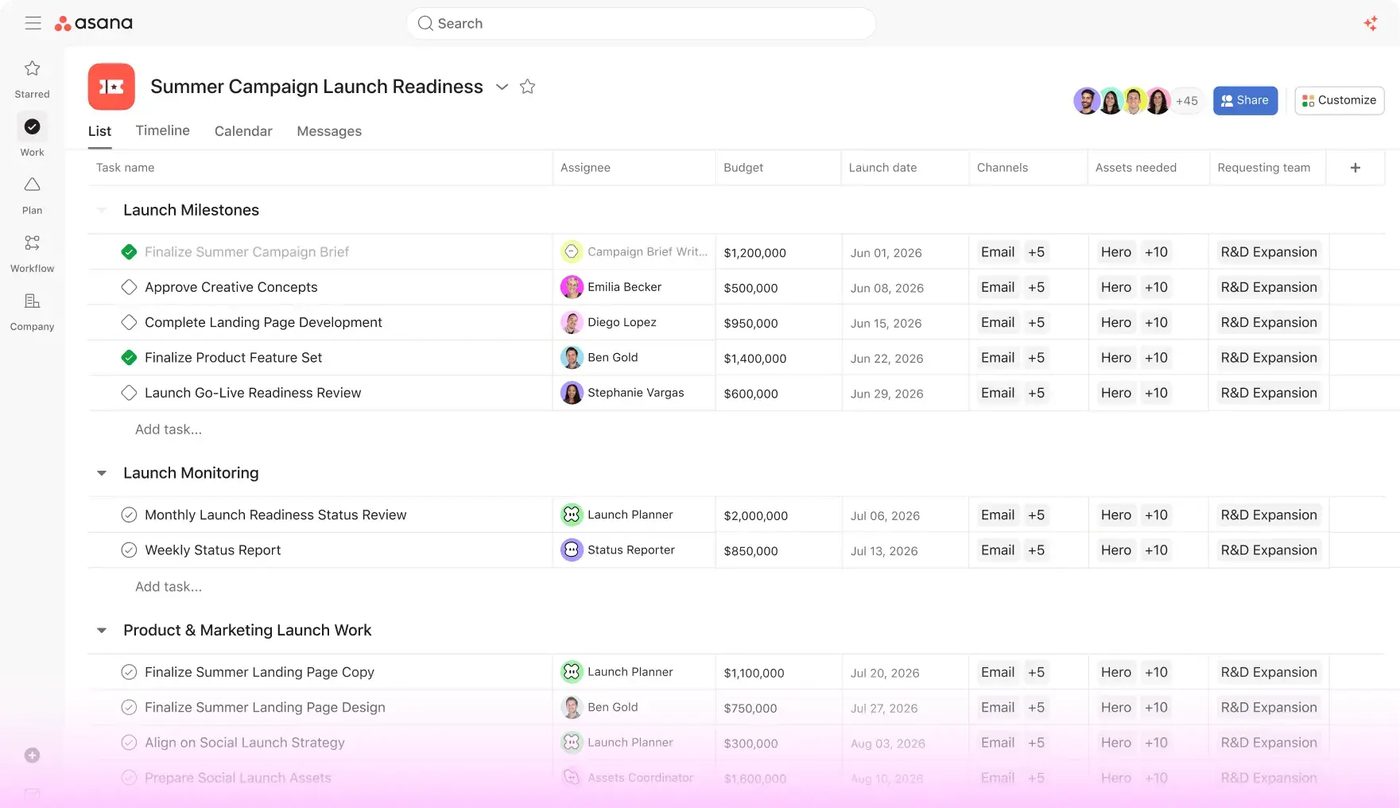
Asana list view of a campaign launch project with tasks, assignees, status and due dates
A project in Asana as a task list: when a deal moves in the CRM, a task like this appears here with the right owner and date. Source: asana.com ↗
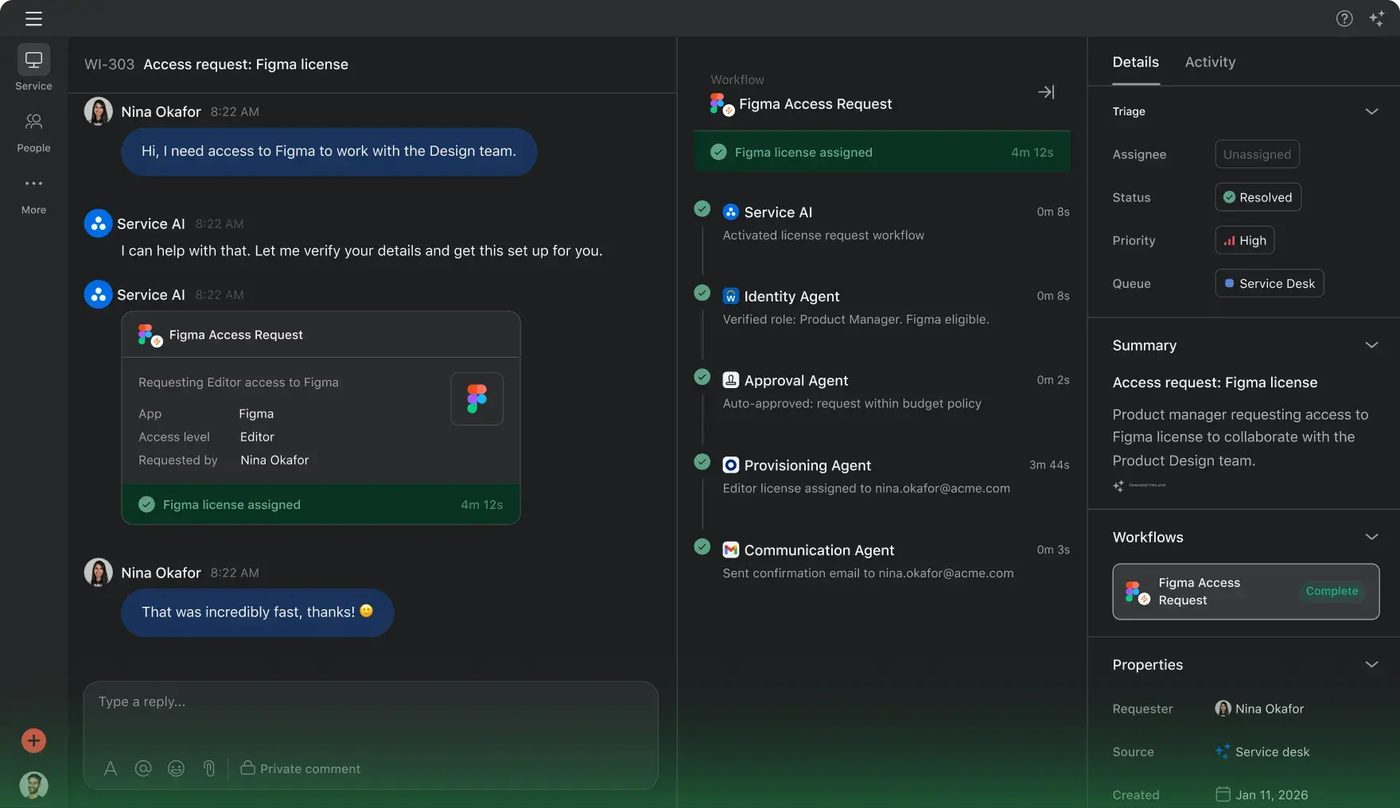
Asana service desk conversation resolved step by step by automated workflow agents
Asana Service: a request comes in, the workflow runs its steps and the status updates — the same events we mirror into the CRM. Source: asana.com ↗

How to start

Three steps from a first message to work on your project.

  1. 01

    Leave a request

    Describe the task in the form — in text or by voice. Budget and timing are optional.

  2. 02

    We review and estimate

    A developer studies the brief, asks about anything unclear and sends an estimate.

  3. 03

    We start

    Once scope and price are agreed, the work begins.

or write to info@coreviaflow.space

Questions

Does our team have to start working in the CRM?
No. The team stays in Asana with its projects, boards and timelines; the CRM only reads task progress and comments and shows them on the deal. The one thing that changes for them is that new tasks already contain the client's details and a link to the card, so they stop asking 'who is this for?'.
Will the connection see all our projects in Asana?
It sees only what the user it signs in as is allowed to see, so we recommend a named user with access to the agreed projects only. Notifications are additionally filtered to the events that matter to the CRM, so the connection hears only about those tasks. Any key can be revoked in the Asana account settings at any moment.
Can a change in Asana get lost on the way to the CRM?
Asana is honest that its notifications are delivered 'at most once': in rare cases an event may not arrive and cannot be replayed. That is why for the fields that matter most — a completed task, a changed deadline — we add a periodic check on top of the notifications, so a missed event is caught on the next pass.
Which side is the source of truth — Asana or the CRM?
We decide it per field, not per system. The client, the deal and the agreed scope live in the CRM and are shown in Asana; task progress, the assignee and the work done live in Asana and are shown in the CRM. Each field has one home, so the two never argue.

Tell us what needs to be connected

Describe the task in text or a voice message. We look at your setup and reply with a plan.