CoreviaFlowCOREVIAFLOWDIGITAL PROJECT COMPANY Leave a request
EN UA RU
E-commerce platformsUS

Magento (Adobe Commerce) integration & automation

An order placed in your Magento store lands in the CRM with the customer and the items, the delivery status goes back to the store, and the manager sees the whole purchase history on one card.

Magento — today Adobe Commerce — is the store platform of companies with large catalogues, several storefronts and their own rules for prices and customers. Orders, customers and products live in the store; the sales team, the call centre and the warehouse usually live in a CRM and in other systems, and orders are copied between them by hand. CoreviaFlow connects Magento to your CRM so that a new order appears on the manager's screen within minutes, the customer's card is shared, and the delivery status returns to the store without anyone retyping it.

What we connect

  • We find out which Magento you run: Magento Open Source, Adobe Commerce in the cloud or on your own servers, or Adobe Commerce as a Cloud Service. The way in and the available objects differ between them.
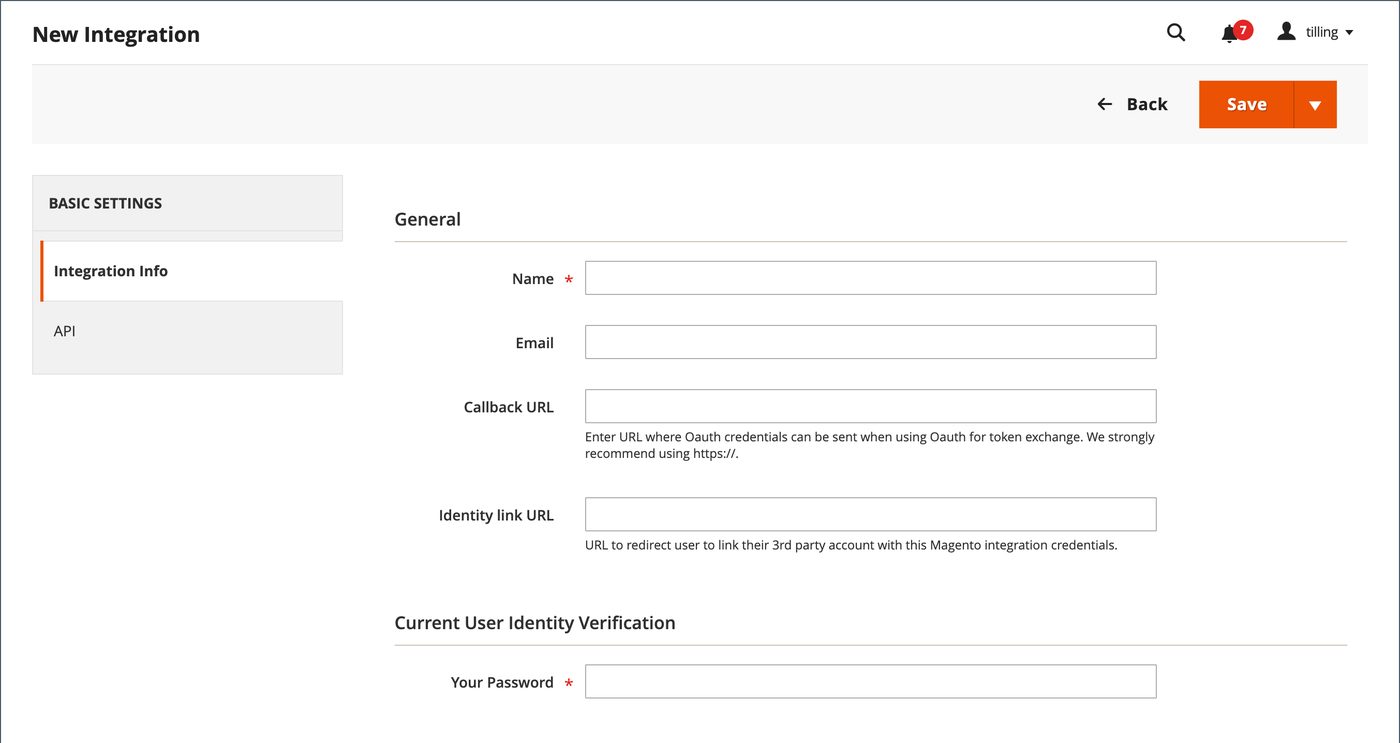
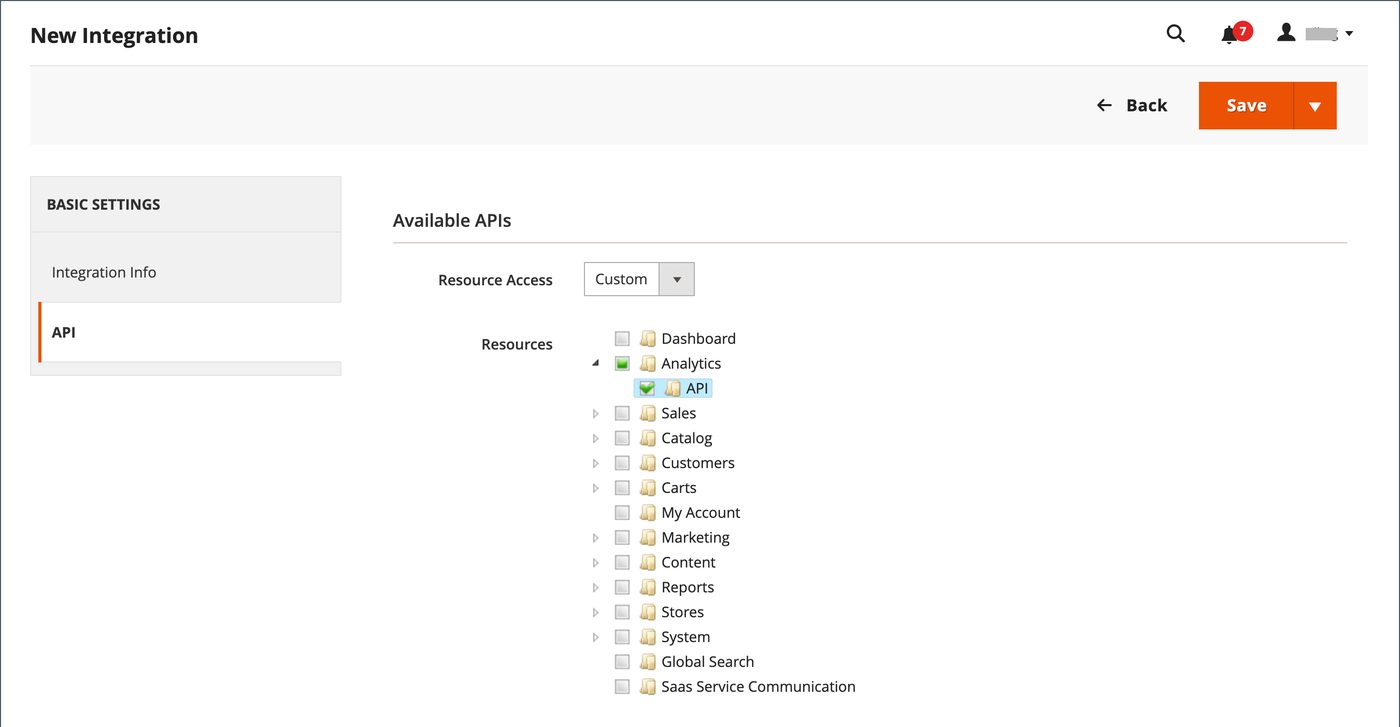
  • Your store administrator creates an integration in the admin panel (System → Integrations) with access limited to orders, customers and products, activates it and hands us the access keys. No one's personal password is involved.
  • Together we decide what travels and where: new orders and their statuses to the CRM, delivery statuses back to the store, customers in both directions, and — if needed — stock balances and prices from your accounting system to the store.
  • We set up the programmatic connection through Magento's official interfaces and match the fields: order statuses, payment and delivery methods, customer groups, product codes.
  • Where your edition lets the store announce an event itself (an order placed, a status changed), the CRM receives it at once; otherwise the CRM checks the store on a short schedule.
  • We test on a few real orders side by side with your current process, then switch the team over and keep watching: if the store refuses a record, the responsible person gets a notice with the reason.

Automation scenarios

01

A new order becomes a deal in the CRM

Before the manager opens the store admin panel every hour, copies new orders into the CRM and forgets the ones that came in overnight.

After a placed order appears in the CRM within minutes with the customer, the items, the delivery address and the payment method; the manager calls with the full cart in front of them.

02

The delivery status returns to the store and to the customer

Before the customer writes 'where is my order?', the manager looks it up in the carrier's site and answers by hand.

After the CRM changes the order status in the store when the parcel is shipped and delivered, and the customer sees it in their account and in the message you already send them.

03

One customer card for the store and the call centre

Before the same person exists in the store and in the CRM as two records, and the manager does not know that the caller has already ordered five times.

After the customer from the store is matched to the CRM card by email and phone; the manager sees the full purchase history and past complaints before answering.

04

Stock balances and prices from accounting to the store

Before the store sells an item that ran out yesterday, and the manager calls the customer to apologise.

After balances and prices go from your accounting system to the store on a schedule; an item that is gone disappears from sale before someone orders it.


How it works technically

For those who want to check: each point links to the official documentation page it comes from.

  • The Adobe Commerce and Magento Open Source web API supports GraphQL, REST and SOAP, and integration with CRM or ERP systems is an officially described use case.

    Source: developer.adobe.com ↗ checked 2026-09-28
  • REST endpoints let an outside system act on behalf of administrators, customers and guest shoppers.

    Source: developer.adobe.com ↗ checked 2026-09-28
  • An integration is created in the admin panel; once its credentials are issued, no separate token requests are needed.

    Source: experienceleague.adobe.com ↗ checked 2026-09-28
  • GraphQL returns exactly the fields requested in a single query, unlike fixed REST responses.

    Source: developer.adobe.com ↗ checked 2026-09-28
  • Adobe I/O Events for Adobe Commerce is an event mechanism: for example, notifying an external ERP every time a shopper places an order.

    Source: developer.adobe.com ↗ checked 2026-09-28
  • The whole order lifecycle — customer, quote, order, invoice, shipment — is available through the REST API.

    Source: developer.adobe.com ↗ checked 2026-09-28

Limits

Magento comes in three deliveries — Magento Open Source, Adobe Commerce in the cloud or on your own servers, and Adobe Commerce as a Cloud Service — and the interfaces differ: in the Cloud Service edition the customer and guest interfaces of the other editions are absent, and every request must be signed through Adobe's identity service. The basic web API framework has no built-in outgoing notifications; the store announces events only through Adobe's separate event service (available in Adobe Commerce) or its synchronous webhooks, which Adobe recommends only when an immediate reply from the outside system is critical — otherwise the CRM checks the store on a schedule. Access keys issued to an administrator expire after 4 hours and customer keys after 1 hour by default, while an integration's keys last until revoked. A newly saved integration is inactive until activated, and anonymous access to the catalogue is off by default.

Screenshots

Magento admin panel: creating a new integration
The New Integration form in the Magento admin panel: this is where your administrator creates a separate access for the CRM connection without sharing anyone's password. Source: experienceleague.adobe.com ↗
Magento integration: choosing which resources the connection may access
The resource tree of a Magento integration: the administrator ticks only sales, customers and catalogue, so the connection sees nothing beyond what was agreed. Source: experienceleague.adobe.com ↗

How to start

Three steps from a first message to work on your project.

  1. 01

    Leave a request

    Describe the task in the form — in text or by voice. Budget and timing are optional.

  2. 02

    We review and estimate

    A developer studies the brief, asks about anything unclear and sends an estimate.

  3. 03

    We start

    Once scope and price are agreed, the work begins.

or write to info@coreviaflow.space

Questions

We have Magento Open Source, not the paid Adobe edition. Does it work?
Yes. Orders, customers and products are available in Open Source through the same official interfaces. What differs is how the store reports events: in Open Source the CRM checks the store on a short schedule instead of receiving an instant notice.
Do you need our admin password?
No. Your administrator creates a separate integration in the admin panel with access only to the objects we agreed on and gives us its keys. The keys can be revoked at any moment without touching anyone's account.
How fast does a new order reach the CRM?
If your edition lets the store announce the order itself, almost at once. If not, the CRM asks the store on a schedule that we set together — usually a few minutes, so the manager sees the order before the customer starts wondering.
We have several storefronts in one Magento. Is that a problem?
No. We decide which storefronts take part and the CRM keeps the storefront on each order, so the manager knows which site and which brand the customer bought from.

Tell us what needs to be connected

Describe the task in text or a voice message. We look at your setup and reply with a plan.