CoreviaFlowCOREVIAFLOWDIGITAL PROJECT COMPANY Leave a request
EN UA RU
Marketing & EmailUS

Intercom integration & automation

A chat in Intercom turns into a lead in your CRM, and the manager sees the deal, the payments and the support history in one card

Intercom is where your site visitors and users write to you: the chat widget, the inbox, the help articles and the outbound messages live there. Sales and payments, though, live in the CRM and the billing system. We connect Intercom to your systems so the two sides stop being separate worlds: a new chat becomes a lead in the CRM, the manager's answer in the CRM shows up in the Intercom conversation, and events from your product — signed up, paid, plan changed — reach Intercom and drive its messages. Support sees the client's deals, sales sees the support history, and nobody copies contacts between the two by hand.

What we connect

  • In your Intercom workspace an application is created for your own use; it comes with an access key that we keep on our side like a password. Everything the connection does happens in your workspace under that key, and you can revoke it at any moment.
  • We check where your workspace is hosted — the US, the EU or Australia — because Intercom uses a separate address for each region; the connection is pointed at the right one from the start.
  • We agree how contacts are matched: by email, by phone or by your own client identifier. Then the same person in Intercom and in the CRM is one record, not two.
  • Intercom itself notifies the connection about what happens in the workspace — a new conversation, a reply, a closed chat, a changed contact. Which events matter is chosen in the Intercom developer settings by hand, so we do it together with your administrator.
  • For the opposite direction we decide which moments in the CRM or the product go to Intercom as events — signed up, paid, plan changed, deal won — so Intercom can show the right message to the right person.
  • Replies can be written into the Intercom conversation from the CRM: on behalf of the operator, or as an internal note that the client does not see. We agree which one your team needs.
  • Before launch we run the connection on a test workspace and on a few real contacts, check both directions and only then switch it on for everyone.

Automation scenarios

01

A visitor writes in the chat

Before the support agent answers in Intercom, decides the person is a potential client and creates a lead in the CRM by hand — or forgets to.

After a new conversation with a new contact creates a lead in the CRM with a link to the chat, and the sales manager picks it up without asking support to forward anything.

02

The client paid

Before the client paid yesterday, but Intercom still shows them a message about the trial ending, because the payment lives in another system.

After the payment in the CRM or the billing system goes to Intercom as an event on the contact, the onboarding series starts, and the trial reminder stops.

03

Sales and support see one client

Before the manager calls a client to offer an upgrade, unaware that the same client has an open complaint in Intercom since Monday.

After the CRM card shows the open conversations and their status, and the Intercom contact shows the deal stage and the plan, so both teams talk to the client knowing the whole picture.

04

The manager replies from the CRM

Before to answer a question from the chat the manager opens Intercom, finds the conversation, writes the reply and then notes it in the CRM.

After the reply written in the CRM goes into the Intercom conversation on behalf of the manager, and the client's answer comes back into the same card.


How it works technically

For those who want to check: each point links to the official documentation page it comes from.

  • The Intercom REST API is the core building block of the platform: through it an integration reads and updates the data of its own workspace — contacts, conversations, events.

    Source: developers.intercom.com ↗ checked 2026-09-28
  • For a private app an Access Token is enough: it is issued when the app is created, opens access to private workspace data and must be stored like a password.

    Source: developers.intercom.com ↗ checked 2026-09-28
  • Contacts in Intercom are leads and users; they can be created through the API and searched by attribute values, for example by email or an external identifier.

    Source: developers.intercom.com ↗ checked 2026-09-28
  • A reply to a conversation through the API can be sent as an admin, as the contact, or as an internal note for the team.

    Source: developers.intercom.com ↗ checked 2026-09-28
  • Webhooks deliver real-time notifications about workspace events; topics are subscribed to in the Developer Hub by hand, not through the API.

    Source: developers.intercom.com ↗ checked 2026-09-28
  • Intercom workspaces are hosted in three regions — US, EU and Australia; the EU and Australian regions use their own API base addresses.

    Source: developers.intercom.com ↗ checked 2026-09-28

Limits

Intercom limits how many requests can be made in a window of time, so bulk operations — importing a large contact base, syncing history — are done in batches on a schedule rather than in one go; the exact limits for your workspace are visible in the developer settings, and we plan the load around them. The list of events Intercom sends to the connection is switched on by hand in the Developer Hub, so an administrator on your side takes part in the setup. A contact created a moment ago may not be found by search for a few minutes, which is why the connection remembers Intercom's own identifier of the contact instead of searching again. The test workspace Intercom gives developers is limited to the US region and a small number of contacts, so the final check is always done on your real workspace. Event details sent to Intercom must be flat values, without nested structures.

Screenshots

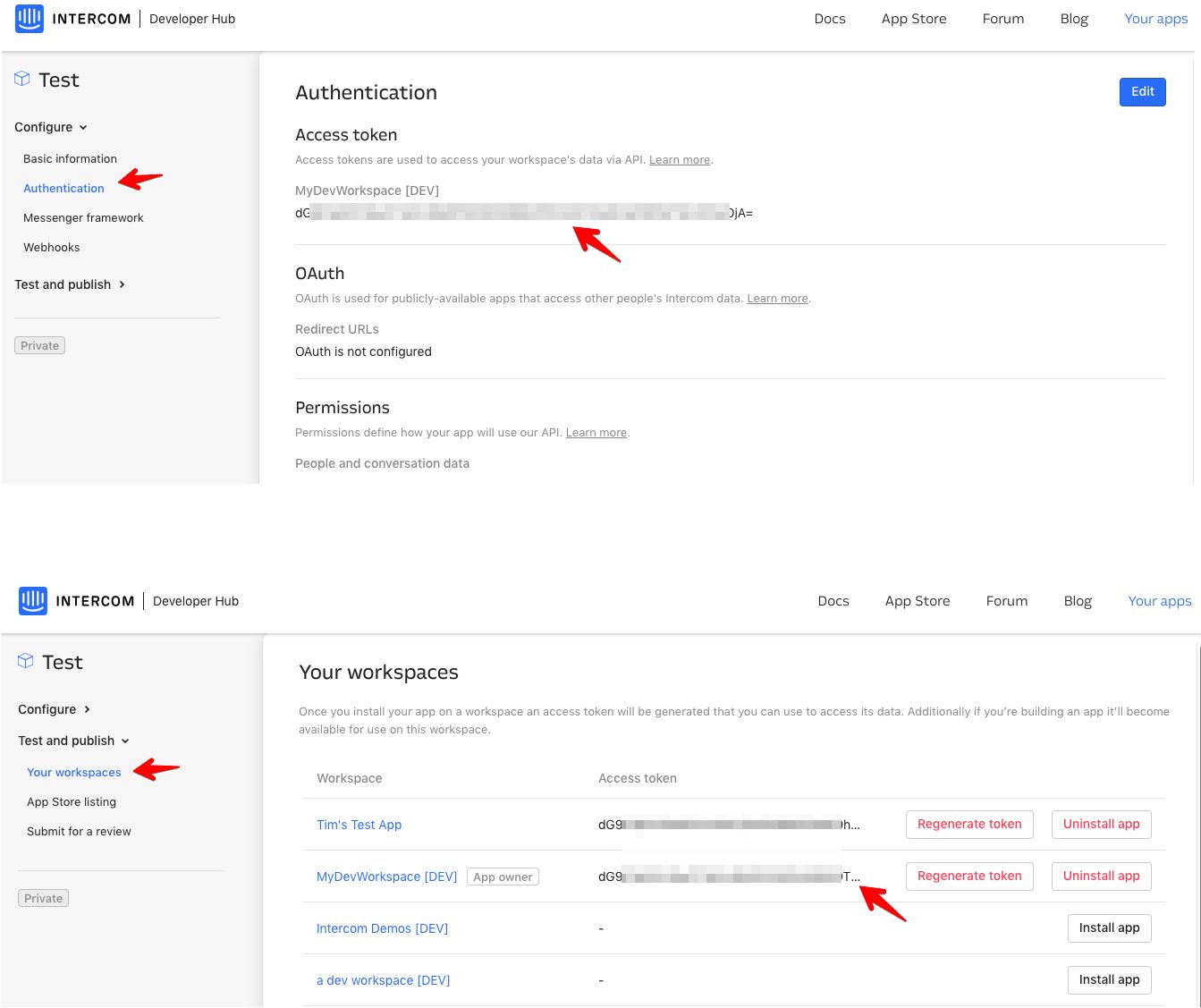
Intercom Developer Hub: authentication settings and workspace access token
Authentication settings in the Intercom Developer Hub (Intercom's own demo workspace): here the client creates the access key that lets the CRM read contacts and conversations. Source: developers.intercom.com ↗
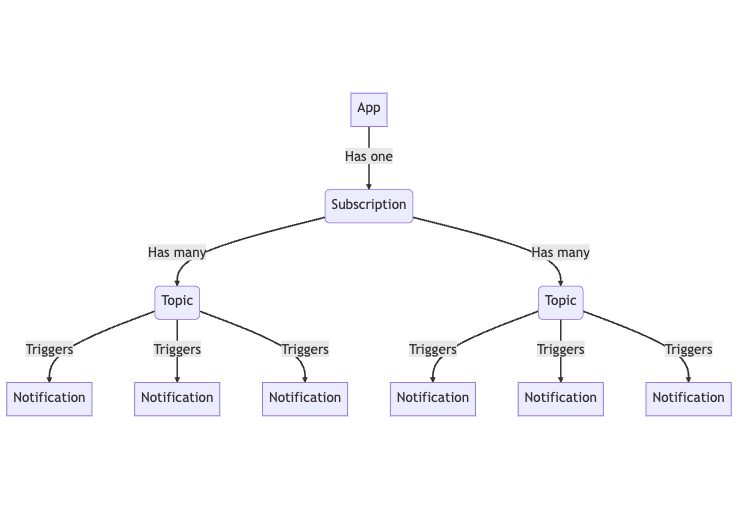
Intercom documentation: how event notifications are organised
Diagram from the Intercom documentation: an app subscribes to topics, and each topic sends a notification, for example a new conversation or a closed one, straight to the CRM. Source: developers.intercom.com ↗

How to start

Three steps from a first message to work on your project.

  1. 01

    Leave a request

    Describe the task in the form — in text or by voice. Budget and timing are optional.

  2. 02

    We review and estimate

    A developer studies the brief, asks about anything unclear and sends an estimate.

  3. 03

    We start

    Once scope and price are agreed, the work begins.

or write to info@coreviaflow.space

Questions

Does the connection need a separate Intercom plan or an app in the marketplace?
No marketplace listing is needed: Intercom lets you create an application for your own workspace only, and the connection works through it. Whether programmatic access is included in your plan is best checked in your Intercom subscription settings.
Our workspace is in the EU. Does that change anything?
Only the address the connection talks to: Intercom keeps a separate one for EU-hosted workspaces. We set it at the start, and your data keeps living where it lives now.
Can chats from Intercom be answered right from the CRM?
Yes. Intercom accepts replies into a conversation on behalf of an operator and internal notes for the team, so the manager's reply written in the CRM appears in the chat, and the client's answer comes back to the CRM card.
What happens with contacts that already exist in both systems?
Before the launch we run a one-time matching by the field you choose — usually email — and link the pairs. Contacts found only on one side are created on the other or left as they are; that is your call.

Tell us what needs to be connected

Describe the task in text or a voice message. We look at your setup and reply with a plan.